Turning Process
作成方法
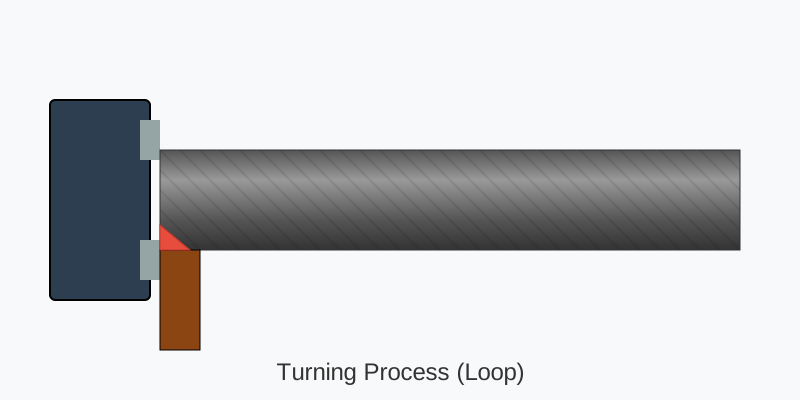
この動画は、旋盤(せんばん)による**「旋削加工(Turning Process)」**をシミュレーションしたSVGアニメーションです。
Google AI Studioに動画データを読み込ませて「この画像を解析して動くSVGファイルを作って欲しい。そのプロンプトを定義してください」と依頼し、この動画と同じものを生成させるための具体的で精度の高いプロンプトを定義しました。
SVGコードを生成させる際は、見た目の描写だけでなく「どのような仕組みで動かすか(SMILアニメーションやマスク処理など)」を指示すると、再現度が格段に上がります。
おすすめのプロンプト(英語)
※コード生成は英語で指示したほうが精度が高いため、英語のプロンプトを推奨します。
以下のプロンプトをコピーして試してみてください。
**Role:** You are an expert in SVG coding and web animation.

**Task:** Create a standalone, single-file animated SVG that visualizes a metal lathe "Turning Process".

**Visual Requirements:**
1. **The Machine (Chuck):** On the left side, draw a dark grey, solid block representing the lathe chuck holding the material.
2. **The Workpiece (Cylinder):**
   - It represents a metal cylinder rotating horizontally.
   - **Rotation Effect:** Use a striped pattern (vertical lines) on the cylinder that translates downwards continuously to simulate rapid spinning speed.
   - **The "Cut" Effect:** The cylinder should have two layers.
     - *Layer 1 (Background):* A light grey/silver cylinder (smaller diameter) representing the finished turned surface.
     - *Layer 2 (Foreground):* A dark grey cylinder (larger diameter) representing the raw material.
3. **The Tool:** A cutting tool (brown holder with a red tip) positioned at the bottom-front of the cylinder.
4. **Debris:** Yellow curvy lines ("chips") flying off the tooltip.

**Animation Logic (Infinite Loop):**
- **Tool Movement:** The tool moves linearly from the right side to the left side along the workpiece.
- **Material Removal:** Synchronized with the tool's movement, the "Foreground" (dark raw material) rectangle must shrink in width (from right to left) to reveal the "Background" (light finished part). This simulates the metal being cut away.
- **Chips:** The yellow chips should appear and fade out near the cutting tip continuously.
- **Label:** Add text "Turning Process (Loop)" at the bottom.

**Technical Constraints:**
- Use SVG SMIL animation tags (`<animate>`, `<animateTransform>`) or embedded CSS Keyframes for smooth motion.
- Ensure the animation loops seamlessly.
プロンプトの解説(日本語)
もし日本語で指示したい場合や、微調整したい場合は、以下の要素が含まれていることが重要です。
- 回転の表現 (Rotation Effect): 単なる静止画ではなく、円柱に「縦縞のパターン(Stripes)」を入れて、それを下方向に移動させることで「高速回転」しているように見せるテクニックを指定しています。
- 切削の表現 (Material Removal): これがこの動画の肝です。「削っている」のではなく、**「手前にある太くて暗い長方形の幅を縮めて、奥にある細くて明るい長方形を見せている」**というトリックを指示しています。
- 同期 (Synchronization): バイト(刃物)の移動と、削られる部分の縮小が連動するように指示しています。
- 切り粉 (Chips): 切削点から黄色い火花や切りくず(Chips)が飛ぶアニメーションを加える指示です。
このプロンプトを使えば、動画とほぼ同じ動きをするSVGコードが出力されるはずです。
生成されたアニメーション
SVGアニメーションの仕組み
SVGは**SMIL(Synchronized Multimedia Integration Language)**という仕組みでアニメーションができます。このSVGファイルは以下の技術で動作しています。
1. 二層構造のトリック
削っているように見せるために、2つの長方形を重ねています:
- 下層(背景): 細い完成品(グレー、80px高さ)
- 上層(前景): 太い素材(ダークグレー、100px高さ)
上層のwidthを580→0にアニメーションすることで、右から左に削られていくように見えます:
<animate attributeName="width" from="580" to="0" dur="6s" repeatCount="indefinite" />
2. 回転の表現
縦縞パターンを下方向に移動させて高速回転を表現しています:
<pattern id="spin-pattern">
  <animateTransform type="translate" from="0 0" to="0 20" dur="0.2s" repeatCount="indefinite" />
</pattern>
3. 切削工具の移動
工具を右端(580)から左端(0)まで移動させます:
<animateTransform type="translate" from="580 0" to="0 0" dur="6s" repeatCount="indefinite" />
4. 切りくず(Chips)
黄色い切りくずを3つ、時間差で飛ばしています:
- 透明度を0→1→0にアニメーション(
<animate attributeName="opacity">) - 位置を移動しながら回転(
<animateTransform>)
これらの技術を組み合わせることで、リアルな旋削加工のアニメーションを実現しています。生成AIがこういったテクニックを理解して、すべてコードで書けるのは非常に興味深いですね。